

ZCF
Configure CoffeeRouter profiles for Claude Code and Codex with ZCF.
Before you begin
Prepare the following:
- Node.js 22 or later, with working
npmandnpxcommands. - A CoffeeRouter token. A dedicated token for ZCF is recommended for easier revocation and auditing.
- The exact model IDs available to that token.
- The target tool: Claude Code or Codex. ZCF can offer to install the target CLI during initialization.
See the official ZCF documentation or the official ZCF repository. ZCF is a third-party community tool, so menu labels may change between releases. This guide follows the current official version.
Endpoint and protocol reference
ZCF generates a different configuration format for each target. Do not interchange these endpoints:
| Target | ZCF field | Value | Protocol |
|---|---|---|---|
| Claude Code | API Base URL | https://www.coffeerouter.ai | Anthropic Messages |
| Codex | Base URL | https://www.coffeerouter.ai/v1 | OpenAI Responses |
The Claude Code endpoint does not include /v1 because the client appends the Messages request path to the base URL. A custom Codex provider expects an OpenAI API base URL, so it must include exactly one /v1.
Start ZCF
Run the following command in PowerShell, a terminal, or WSL:
npx zcf
On first launch, select the interface language and AI output language. If ZCF is managing the wrong tool, choose Switch tool from the main menu and select Claude Code or Codex.
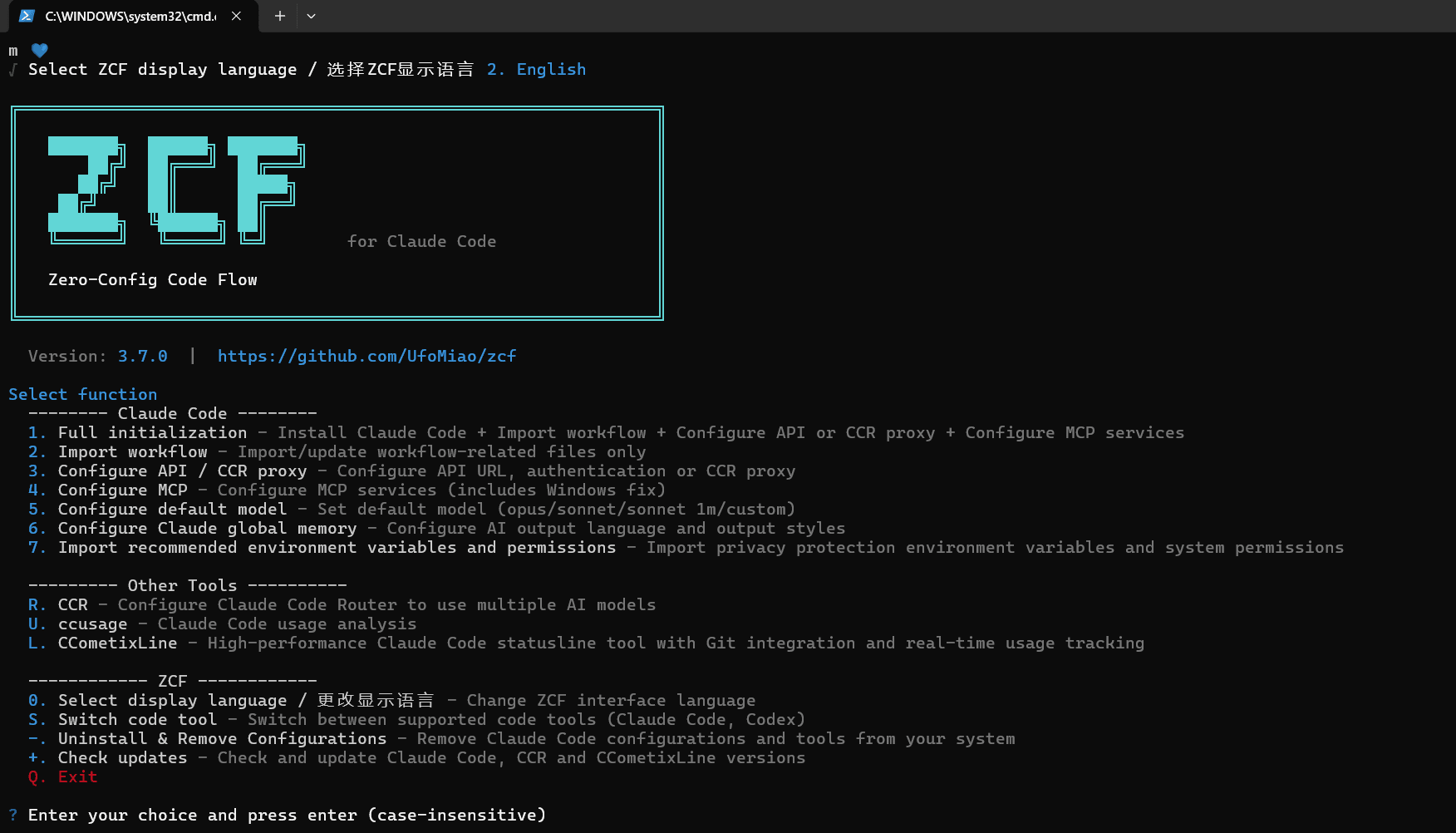
Choose Complete initialization when the target tool has not been configured yet. Choose Configure API when you only need to add or change the API provider. If ZCF detects an existing configuration, review the backup, merge, and keep options before continuing.
Connect Claude Code
1. Select a custom provider
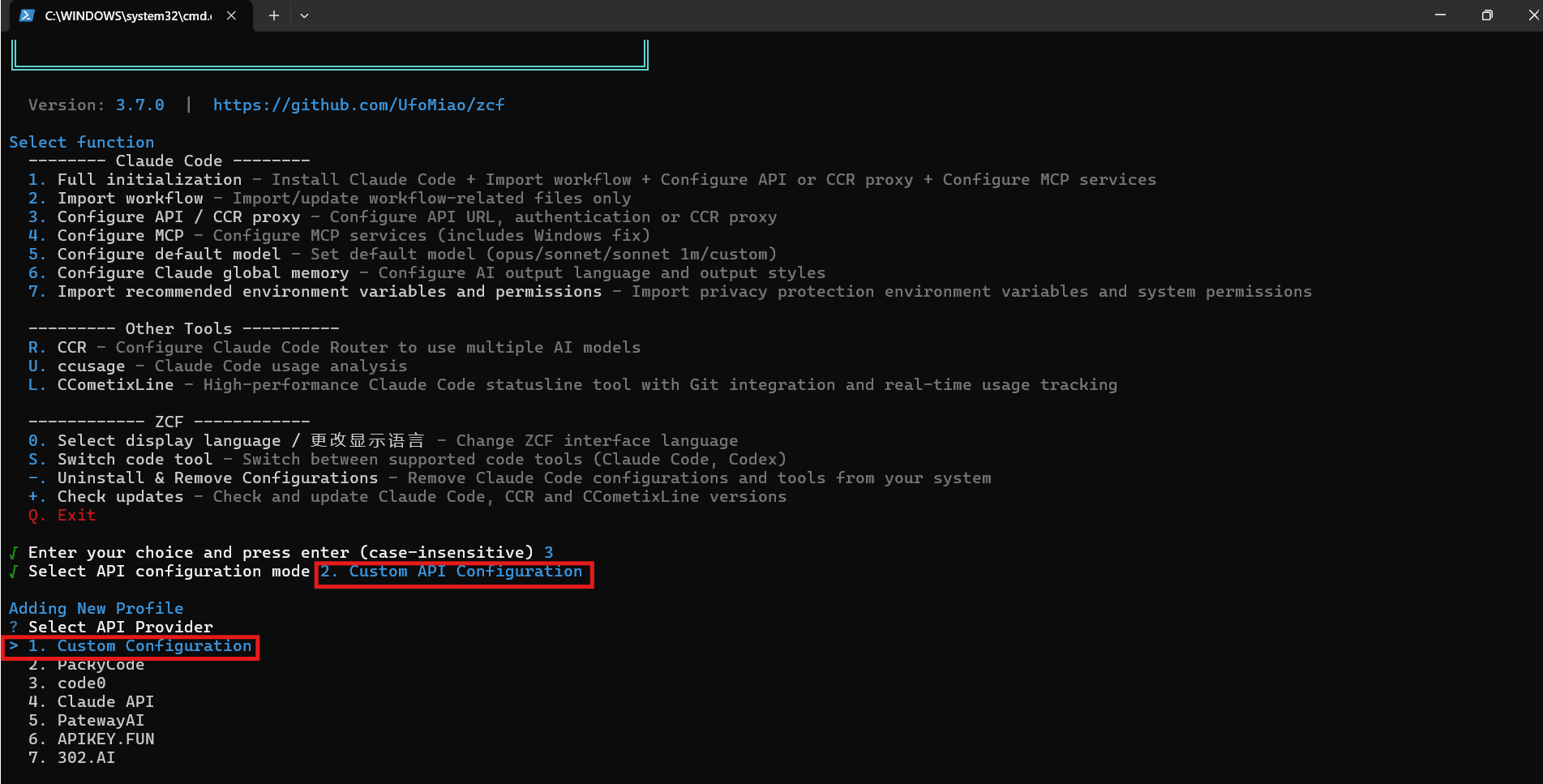
Switch the active tool to Claude Code, open Configure API, and select Custom API configuration. Choose Custom configuration from the provider list. If ZCF already manages profiles, choose the action to add a new profile.
2. Enter the CoffeeRouter settings
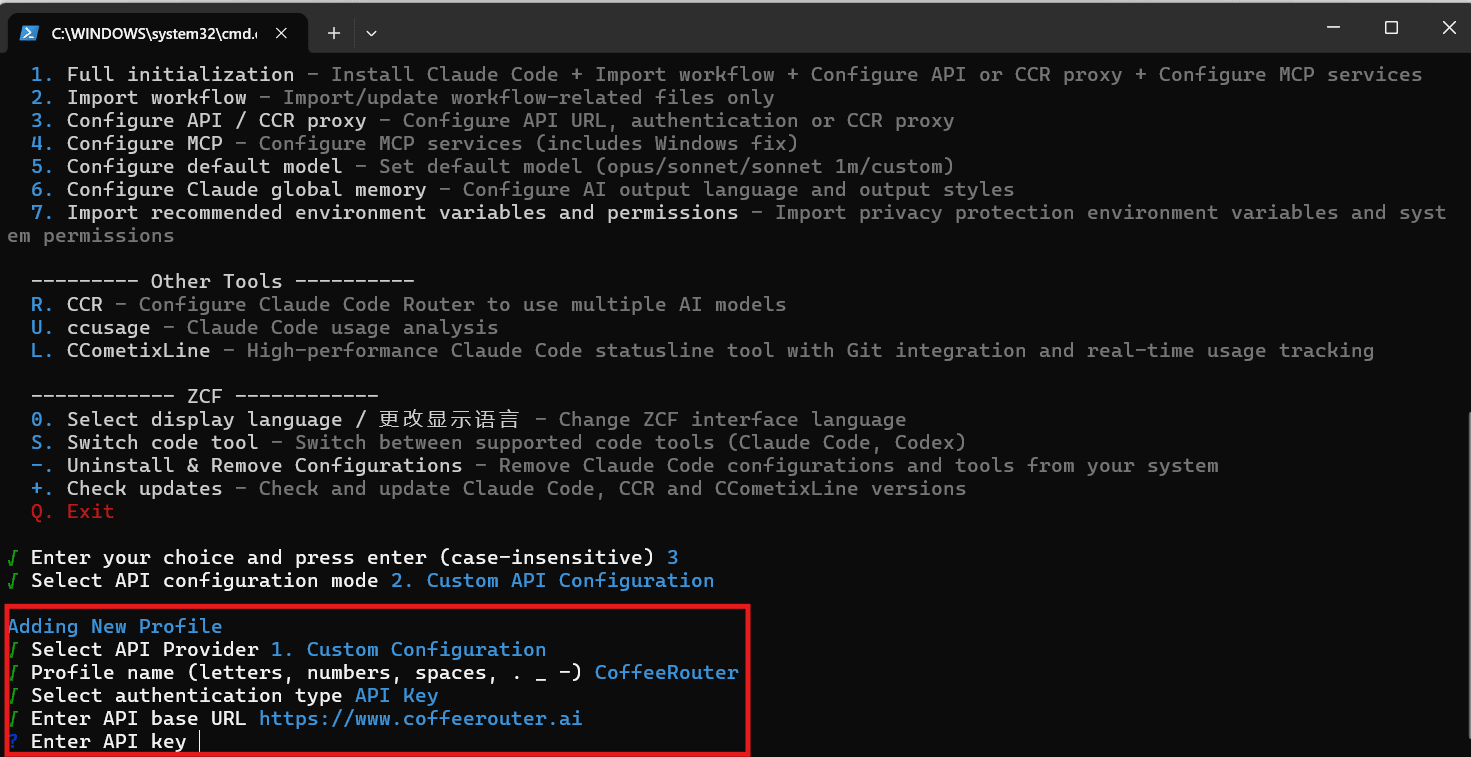
Enter the following values when prompted:
| Field | Value |
|---|---|
| Profile name | CoffeeRouter |
| Auth type | API Key |
| API Base URL | https://www.coffeerouter.ai |
| API Key | A CoffeeRouter token, such as sk-your-api-key |
Do not enter https://www.coffeerouter.ai/v1 as the API Base URL. Claude Code may otherwise produce a duplicated path.
3. Configure model mappings
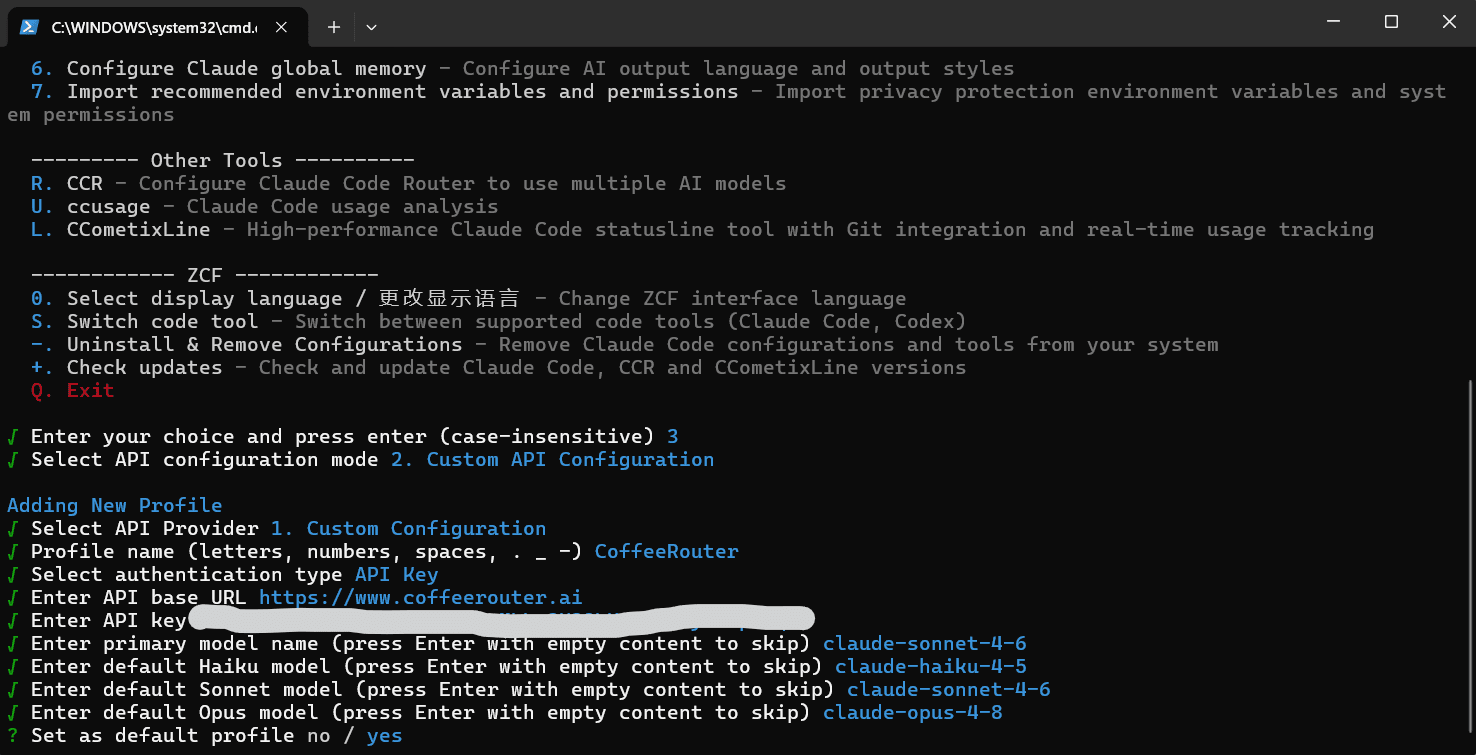
ZCF then asks for a primary model and optional Haiku, Sonnet, and Opus mappings. Use the complete model IDs shown for your token in CoffeeRouter:
- Primary model: enter the Claude / Anthropic-compatible model used by default.
- Haiku, Sonnet, and Opus models: enter matching model IDs only when you need separate role mappings; otherwise leave them empty.
- If the token exposes only one compatible Claude model, start by setting only the primary model.
Do not abbreviate or rewrite a model name. It must exactly match the ID shown by CoffeeRouter.
4. Save and verify
Set this profile as the default when appropriate. ZCF applies it to ~/.claude/settings.json. Then run:
claude
Send a simple test message in Claude Code. A 401 response usually indicates a token issue; a model-unavailable response usually indicates a permission or model-ID mismatch.
Connect Codex
1. Switch to Codex
From the ZCF main menu, choose Switch tool → Codex, then open Configure API → Custom API configuration → Custom configuration.
2. Enter the custom provider
Enter:
| Field | Value |
|---|---|
| Provider name | CoffeeRouter |
| Base URL | https://www.coffeerouter.ai/v1 |
| API Key | A CoffeeRouter token, such as sk-your-api-key |
| Model name | A model ID available to the current token |
| Protocol (automatic) | Responses |
The current ZCF release automatically writes custom Codex providers with the Responses protocol, so no protocol field needs to be entered manually. Keep exactly one /v1 in the Base URL.
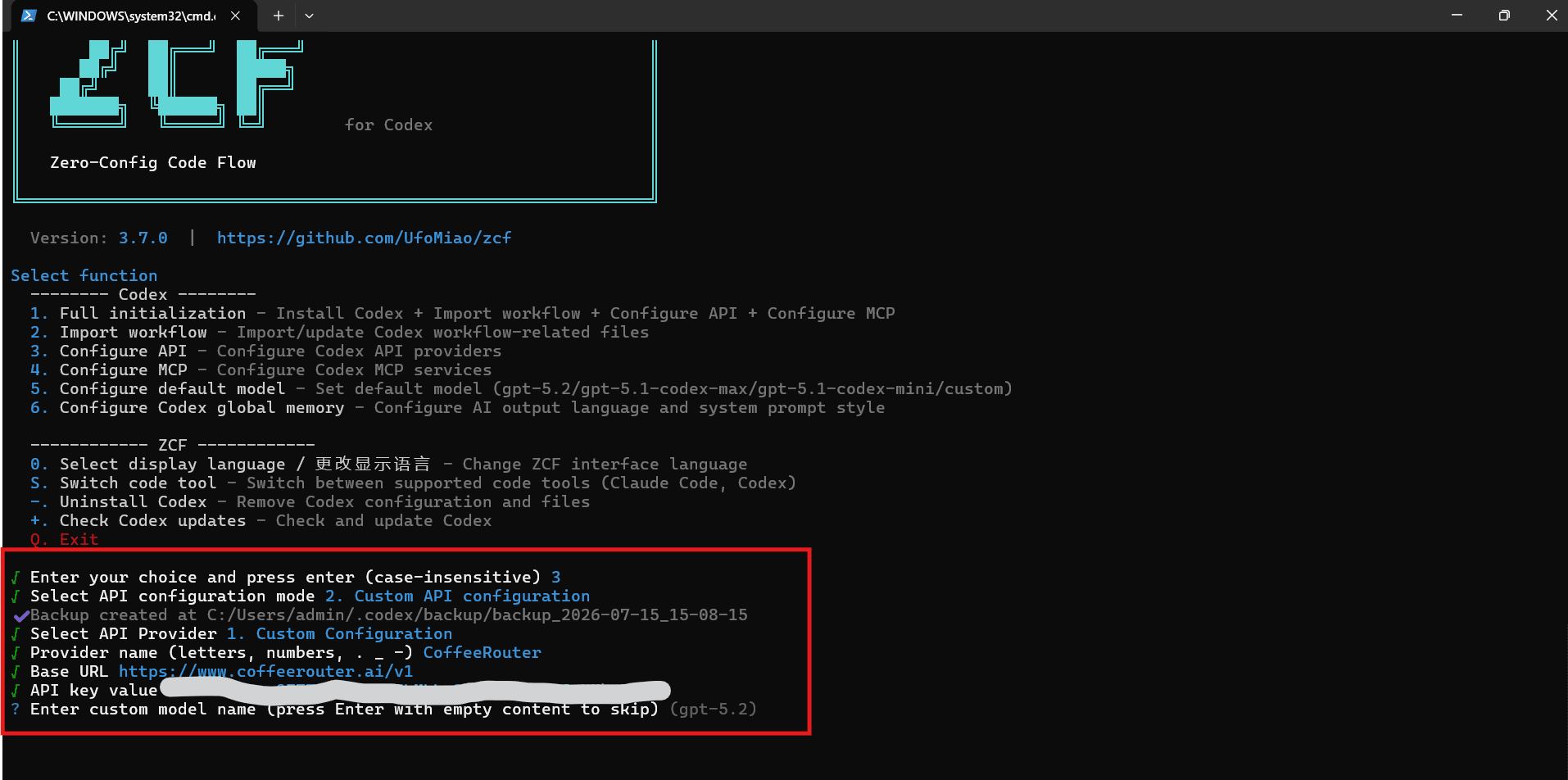
Finish without adding another provider and set CoffeeRouter as the default provider. ZCF updates ~/.codex/config.toml and ~/.codex/auth.json. Then run:
codex
Send a small coding task to confirm that the model responds and basic tool use works.
Optional: non-interactive configuration
Interactive configuration is safer on a personal computer because it avoids placing a real token directly in shell history. The commands below only demonstrate the current ZCF argument format. Replace the model ID and protect the token before using them.
Claude Code
npx zcf i -s -T claude-code -p custom -t api_key -k "sk-your-api-key" -u "https://www.coffeerouter.ai" --api-model "your-claude-model-id"
Codex
npx zcf i -s -T codex -p custom -t api_key -k "sk-your-api-key" -u "https://www.coffeerouter.ai/v1" --api-model "your-model-id"
ZCF command options can change between releases. Run npx zcf --help to verify your installed version before using the command in automation.
Configuration files and security
ZCF currently uses these local paths:
| Content | Default path |
|---|---|
| ZCF global configuration | ~/.ufomiao/zcf/config.toml |
| Claude Code settings | ~/.claude/settings.json |
| Codex provider settings | ~/.codex/config.toml |
| Codex credentials | ~/.codex/auth.json |
Switch or revoke a configuration
To switch between saved profiles, run:
npx zcf config-switch -T claude-code
or:
npx zcf config-switch -T codex
To revoke access, first disable or delete the dedicated token in CoffeeRouter Token Management. Then remove the profile through ZCF or manually remove the CoffeeRouter provider from the target tool's configuration. Deleting only the local configuration does not invalidate an exposed token.
Troubleshooting
Why does Claude Code omit /v1 while Codex includes it?
The clients append request paths differently. Claude Code expects an Anthropic Messages base endpoint and uses the site root. Codex expects an OpenAI Responses base URL and uses the endpoint with one /v1.
Does ZCF proxy requests through its own server?
No. ZCF creates and switches local configuration. Claude Code or Codex sends actual model requests directly to the CoffeeRouter endpoint you entered.
ZCF reports 401 or an invalid API key
Confirm that the complete token was copied, is active and unexpired, and has available balance. Also verify that token restrictions such as IP allowlists permit the current device.
ZCF reports 404 or a missing path
Check the endpoint for the selected target: Claude Code uses https://www.coffeerouter.ai, while Codex uses https://www.coffeerouter.ai/v1. Do not append /v1 twice.
The selected model does not work
Return to CoffeeRouter Token Management, verify that the token can use that model, and copy the model ID exactly into ZCF. Claude Code should use a Claude / Anthropic-compatible chat model. Codex should use a model compatible with OpenAI Responses.